
Disclosure: Lifted At Home is reader-supported. Some links on this page are affiliate links, which means we may earn a commission if you buy through them, at no extra cost to you. See our Affiliate Disclosure.
This article is general information for caregivers. It is not medical advice, and it is not a substitute for a doctor, occupational therapist, physiotherapist or your local council’s social care team. An alarm does not stop falls. If the person you support has fallen, is falling more often, or cannot get up from the floor, ask their doctor or GP for a falls assessment as well as choosing an alarm.
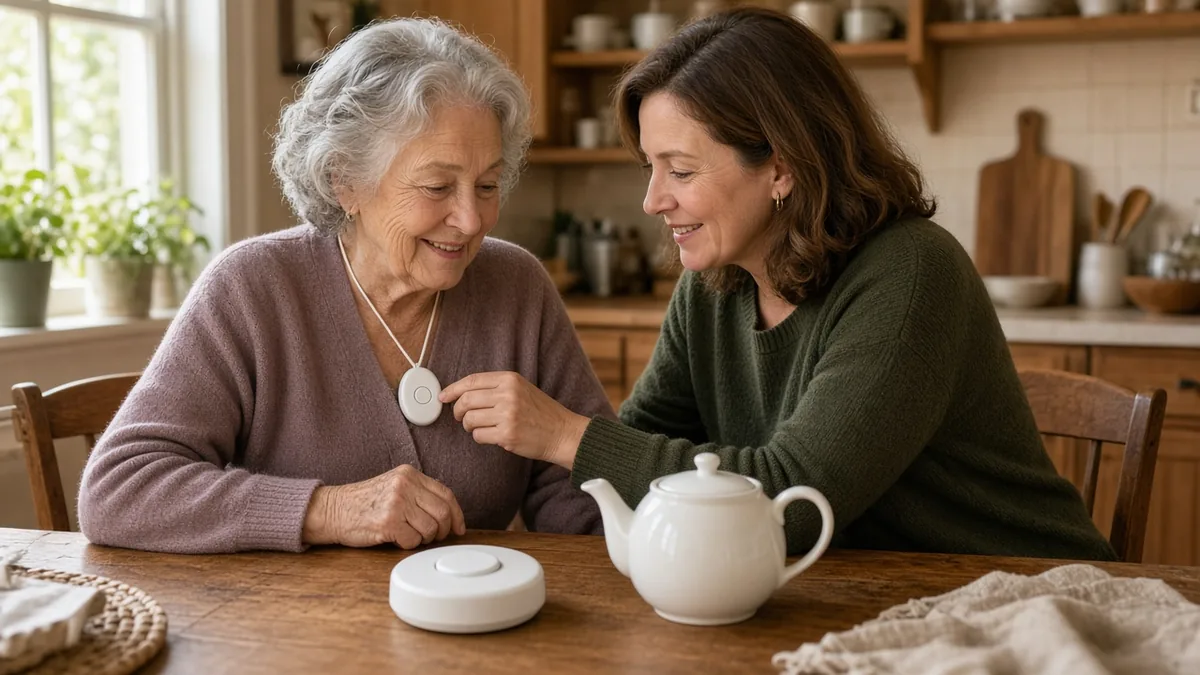
After a fall, families tend to ask the same question in two different languages. In the US it is “which medical alert should we get?” In the UK it is “should Mum have a personal alarm, or a pendant from the council?” They are the same kind of product: a button worn on the wrist or around the neck that gets help when the person cannot reach a phone. Many now add automatic fall detection.
This guide explains the choices that actually matter: who answers when the button is pressed, what fall detection can and cannot do, and whether the system needs a landline, broadband or a mobile signal. Then it names real US and UK services. Every product detail and price below comes from the provider’s own website or an official page, checked on 23 November 2026. Prices and promotions change often, so treat them as a starting point and confirm them before you order. We have not tested these services ourselves.
The short answer
- Choose a monitored service if the person lives alone, or is often alone for long stretches, and there is no one nearby who can reliably answer an alert at 3 a.m. A trained operator answers 24/7 and calls family, a neighbour or emergency services.
- An unmonitored alarm (one that rings a family member’s phone, or a simple carer pager) can be enough when someone lives in the same house or very close by and will always hear it.
- Add fall detection if the person might be knocked out, confused or unable to press a button after a fall. But treat it as a backup, not a guarantee. Every provider we checked says it cannot catch every fall.
- Choose home or mobile by where the person actually goes. A home unit covers the house and usually the garden or yard. A mobile (GPS) device works wherever there is a mobile signal, but it has to be charged.
- In the UK, check digital compatibility. The old analogue phone network is being switched off by January 2027. Ask any provider whether their alarm works without an analogue landline.
Medical alert or personal alarm: the names
In the US these are usually called medical alert systems or PERS (personal emergency response systems). In the UK they are personal alarms, lifeline alarms, community alarms or telecare. Telecare is the wider term that also covers sensors around the home. The NHS describes the main types as basic alarms that make a loud noise, alarms that alert a family member’s phone, monitored alarms connected to a 24-hour service, fall detectors, and GPS tracking alarms (NHS: personal alarms, monitoring systems and key safes).
Monitored vs unmonitored
| Monitored (24/7 response centre) | Unmonitored (family or carer alert) | |
|---|---|---|
| Who answers | A trained operator, day and night | Whoever receives the call, text or pager alert |
| What happens next | Operator talks through the device, then calls your chosen contacts or emergency services | Depends entirely on that person seeing it and acting |
| Cost | Monthly subscription, sometimes plus a set-up or device charge | Usually a one-off purchase |
| Good fit | Lives alone; family far away or working; night-time risk | Shares a home with a carer; short periods alone; a carer pager in the next room |
| Weak spot | The ongoing cost, and the need to keep contact details up to date | A phone on silent, a carer asleep or out, or no one in range |
Simple unmonitored options include wireless caregiver call buttons and pagers (wireless caregiver pager at Amazon US, carer pager at Amazon UK). These are useful inside one home. They do not call anyone outside it.
What fall detection can and cannot do
Automatic fall detection uses motion sensors in the pendant or watch to spot the pattern of a hard fall. If the person does not respond, it raises an alert without anyone pressing a button. It is a genuinely useful extra. It also has limits, and the providers themselves say so:
- Medical Guardian: fall detection “is very good but does not work 100% of the time”, and you should press the button if you are able (medicalguardian.com).
- Careline365: “No fall detector can detect every fall.” Slower falls, such as slipping gradually from a chair, may not be detected, and how the device is worn makes a difference (Careline365 fall detection).
- Apple: “Apple Watch cannot detect all falls”, and high-impact activity can be mistaken for a fall (Apple Support: Fall Detection).
- Taking Care says its fall detection “is designed to recognise hard falls” (Taking Care Digital Fall Alarm).
In practice, caregivers should plan for three things. First, a slow slide off the bed or the toilet is the kind of fall providers warn may not be detected. Second, a pendant left on the bedside table detects nothing. Third, false alarms happen, so the person needs to know it is fine to tell the operator “I’m OK”. Wear it where the maker says (Medical Guardian advises outside clothing, close to the chest), keep it charged, and practise pressing the button.
Landline, broadband or mobile?
- Landline home units plug into a phone socket. They suit a home with a working landline and poor mobile signal. In the US, Bay Alarm Medical, MobileHelp and LifeFone all list landline home options.
- Cellular home units have a built-in SIM and need only power. Bay Alarm Medical says its cellular SOS Home includes AT&T or Verizon service, and MobileHelp says its Classic Cellular needs no landline. In the UK, Taking Care’s Digital Fall Alarm uses multi-network mobile SIMs and does not need a phone line.
- Broadband hubs: Careline365’s Home Alarm Hub works best plugged into your internet router.
- Mobile GPS devices (pendants, clips and watches) work anywhere with mobile signal and can share location. Battery life is the trade-off. Bay Alarm Medical says its mobile devices typically need recharging every one to six days, depending on model and use.
UK digital switchover: the UK government says the analogue phone network (PSTN) is being switched off by January 2027. It says people who use telecare should contact the phone provider on their bill, and that providers are offering free engineer visits and battery back-ups where needed (GOV.UK: moving landlines to digital technologies). The NHS warns that an analogue telecare alarm may not work properly with a digital landline. If you are buying now, ask directly: “Is this alarm digital, and does it need my landline?” Then test it after any phone line change.
US options we checked
All four companies below advertise 24/7 US-based monitoring. Prices are what each homepage showed on 23 November 2026. Add-ons, device fees, taxes and promotions vary, so get a written quote.
Medical Guardian
Medical Guardian offers home and mobile systems, including the Guardian Flex, a mobile device with GPS that it says can stay charged for up to 5 days. Fall detection is listed as an available add-on. Its wearables are described as water-resistant for the shower, but base units must be kept dry. The homepage describes the cost only as “about $1 a day”, so ask for the exact monthly price of the device and fall detection together. It also suggests asking your health insurer whether a device is covered (medicalguardian.com).
Bay Alarm Medical
Bay Alarm Medical lists four systems: SOS Home (landline or cellular), SOS Micro, SOS Smartwatch and SOS All-In-One 2. Automatic fall detection is built in or available as an optional add-on pendant, depending on the system. Prices start from $27.95 per month, with no long-term contracts. Its FAQ says Original Medicare (Parts A and B) does not cover medical alert systems, but some Medicare Advantage plans and private insurers may (bayalarmmedical.com).
MobileHelp
MobileHelp offers the Elite on-the-go device, which runs on AT&T’s 4G LTE network with GPS and Wi-Fi location. It also has Classic Cellular and Classic Landline home systems, with in-home coverage of up to 1,400 feet depending on the device. The homepage listed home plans from $29.95 per month and on-the-go plans from $37.95 per month, month-to-month with no contract. On the day we checked it was also advertising free automatic fall detection as a promotion, so ask whether that still applies (mobilehelp.com).
LifeFone
LifeFone lists At-Home Landline, At-Home Cellular and On-the-Go (VIPx2, a voice-in-pendant device) systems. It states no activation or equipment fees, a 30-day money-back guarantee, cancellation at any time, and “just $5 more per month to add automatic fall detection” (lifefone.com).
Apple Watch fall detection (US and UK)
Apple Watch fall detection works on Apple Watch SE or later, Series 4 or later, and Apple Watch Ultra. If the watch detects a hard fall and the wearer stays still for about a minute, it starts a 30-second countdown and then calls emergency services. It also messages the emergency contacts saved in Medical ID. It switches on automatically if the wearer’s age is set to 55 or over. It needs a cellular watch, Wi-Fi calling, or a nearby iPhone (or satellite on supported models), and Wrist Detection must be on (Apple Support).
The key difference: Apple Watch is unmonitored. It calls emergency services, not a response centre that knows the person and calls the neighbour with the key. It also needs daily charging and an older person comfortable with a touchscreen. It suits active, tech-confident people best.
UK options we checked
UK alarm prices are usually shown excluding VAT, because many people with a long-term condition or disability qualify for VAT relief. Check whether that applies to you and whether the quoted price includes it.
Taking Care
Taking Care’s Digital Fall Alarm is a home and garden alarm with automatic fall detection. On 23 November 2026 it showed a £49.99 set-up cost as an online Black Friday offer (normally £69.99, ending 30 November 2026) and £28.49 a month, excluding VAT. It uses a built-in mobile connection with multi-network SIMs, so it needs no landline. The pendant works up to 300 metres from the alarm unit, and the unit has about 40 hours of battery in a power cut. The equipment is rented, with a 30-day money-back guarantee. Taking Care also lists a Digital Personal Alarm and a GPS “Anywhere” fall alarm (taking.care).
Lifeline24 (now LifeConnect24)
The Lifeline24 website now redirects to LifeConnect24. Its homepage advertised a personal alarm with fall detection from £30 a month (shown against £36), with one month free when paying annually, plus GPS watch and GPS pendant options. It says its 24/7 UK response team is accredited by the Telecare Services Association. Its setup steps still mention connecting the alarm to the telephone socket, so confirm which model you are getting and whether it is digital (lifeconnect24.co.uk).
Careline365
Careline (careline.co.uk, trading as Careline365) says every device includes fall detection as standard. The choices are a Home Alarm Button and Hub, a Personal Alarm Watch, and a GPS Alarm Pendant, the last two with a built-in SIM. Plans were shown from £27.50 a month plus a £99 one-off charge for the device. Its site gives the annual service price as £360 (careline.co.uk).
Council telecare and community alarms
Many UK councils run or commission a telecare or community alarm service. The NHS says these are usually basic systems. You ask your council’s adult social services, and they arrange a home assessment. A council needs assessment is free and can also lead to other equipment and home adaptations (NHS: getting a care needs assessment). Charges and response arrangements vary by council. Some send a responder, others call your named contacts, so ask exactly who comes and how quickly. For private providers, the NHS points to the Telecare Services Association.
Questions to ask any provider
- Who answers, where are they, and is it 24/7?
- Exactly what is the monthly price with fall detection included? Are there set-up, device, shipping or cancellation charges?
- Does the home unit need a landline, broadband or mobile signal? (UK: is it digital?)
- How far from the base unit does the button work? Do a range test in the bathroom, the garden and the bedroom with the door shut.
- Can the button be worn in the shower? (Most wearables are described as water-resistant; base units usually are not.)
- How often does it need charging, and what warns us when the battery is low?
- Who will they call first, and can we change the order? How do they get in if the door is locked?
Do not forget the door
An operator can send help, but help still has to get in. A key safe by the front door, with the code held by the alarm service and trusted contacts, solves a problem many families only think of at 2 a.m. The NHS notes that some key safes are police-approved. Examples: key lock box at Amazon US in the US, or police approved key safe at Amazon UK in the UK. Fit it to the maker’s instructions and keep the code private.
Bottom line
If the person is often alone, choose a monitored service, decide on home or mobile by where they actually spend their day, and add fall detection as a backup, not a promise. In the US, compare Medical Guardian, Bay Alarm Medical, MobileHelp and LifeFone on the full monthly price with fall detection included. In the UK, compare Taking Care, LifeConnect24 (formerly Lifeline24), Careline365 and your council’s telecare service, and make sure whatever you choose works on a digital line. Whatever you pick, it only works if it is worn. Then work on preventing the next fall too: see our room-by-room home safety checklist.